[toc title=”Contents” style=”width:50%”]
A while back, I came across Jeffrey Sambells post about iOS Wireless App Distribution, thought “that’s cool, I could automate most of that” and then promptly forgot about it. A little after this, Hunter Hillegas introduced iOS Beta Builder which I also thought “cool, I could extend that to do some of the automation I thought about” and then forgot about it again.
Ad Hoc app distribution
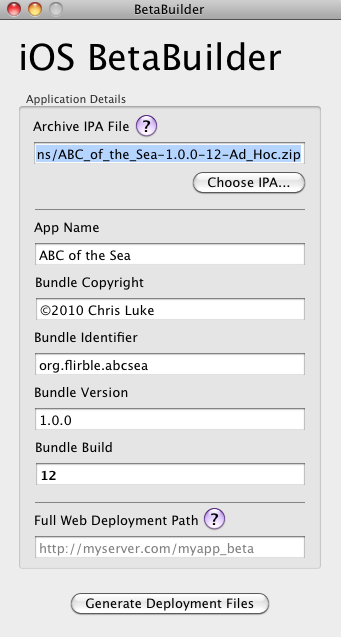
BetaBuilder-TFO App
I already had a small shell script I run to make my `.ipa` files which saves me from the tediousness of “Build and Archive” and then saving the archived file – if I have to click something, it loses my attention. I already build iOS projects with an extra build configuration called “Ad Hoc” that signs with the current Ad-Hoc distribution profile. Beta Builder nicely took the [cci].ipa[/cci] (which is really just a zip file), discovered the contents and produced a handful of useful things:
- The manifest file, that iOS 4.0 and newer can use to find the `.ipa` file.
- A zip file containing the `.ipa` file and a copy of the distribution profile, for users that need to use iTunes to load Ad-Hoc builds.
- A nice `index.html` to link to all of the above with brief instructions.
Initially I setup Beta Builder to deliver the files it built to a local directory and simply `rsync`’ed the structure to my origin HTTP server. That was nice, but it involved too much clicking for my liking. Hunter had hinted that the source would appear on GitHub sometime… but again, I forgot all about it until he posted version 1.0.1 and I happened to want to distribute another build of ABC of the Sea. I was motivated. What I wanted to achieve was to be able to build an Ad-Hoc target in Xcode and then run one script to publish the package. I love this stuff. To get there, I decided I needed:
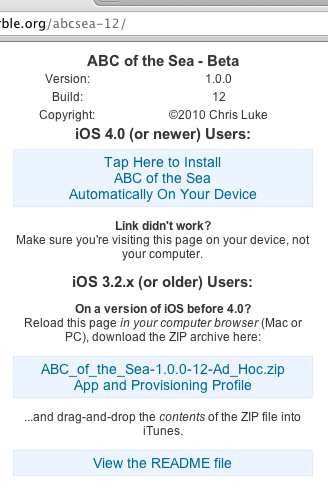
BetaBuilder generated HTML
- My existing script that builds an `.ipa` from the build directory.
- A non-interactive version of Beta Builder, driven from the command line.
- For Beta Builder to read more keys from the projects `Info.plist` file, in particular, to differentiate between the application version and build number.
- To link to the `README.txt` file on the HTML page that Beta Builder generates.
- To have a more useful name for the legacy zip file it generates.
- And then rsync the resulting files to my origin server.
I made a copy of Beta Builders source tree in a local SVN repository and hacked away (sometime I’ll create a branch and commit it back to GitHub). I won’t belabor over what I changed (diffs and such are attached) but it suffices to say that I can publish my beta releases with one command, sweet.
The scripts
Aside from my hacked version of Beta Builder, there are three shell scripts that run together.
- `
/Scripts/package-app.sh` which knows the project and target names to use for a given project. - `$HOME/bin/package-app` that does most of the grunt work.
- `$HOME/bin/sync-iosbeta` that copies my local iosbeta directory tree to the origin HTTP server.
The first of these is very simple. Its responsibility is to validate the only parameter it receives (the target configuration name, Debug, Release, Ad Hoc), ensure the build is uptodate (call `xcodebuild`) and then package it all up.
#!/bin/sh
# $Id: package-app.sh 335 2010-09-03 00:07:00Z chrisy $
conf="$1"
[ "$conf" = "AdHoc" ] && conf="Ad Hoc"
if [ "$conf" != "Debug" -a "$conf" != "Release" -a "$conf" != "Ad Hoc" ]; then
        echo "ERROR: Invalid configuration. Use Debug, Release or Ad Hoc."
        exit 1
fi
cd $(dirname $0)/../ || exit 1
xcodebuild -configuration "$conf" || exit 1
exec $HOME/bin/package-app 'ABC of the Sea' 'ABC of the Sea' "$conf"
The real work is done in `package-app`. The primary function is to build a ZIP file crafted in the correct manner. This is simply a copy of the targets build directory but prefixed with `Payload/` in the path. The resulting file is often suffixed with `.ipa`, but `.zip` works just as well with all the tools I have tried it with. I since tweaked the script to call my modified Beta Builder and distribute the results, and my tweaks to Beta Builder include steps to name the package as a `.ipa`, just in case.
This is not the cleanest of shell scripts, but it is functional:
#!/bin/sh

project=$1
app=$2
type=Release
extra=

if [ -z "${project}" -o -z "${app}" ]; then
        echo "Usage:   $(basename $0) <project name> <target name> [configuration]"
        echo "example: $(basename $0) FivePeeEmm 5somewhere"
        echo "configuration defaults to 'Release'"
        exit 1
fi

if [ ! -z "$3" ]; then
        type=$3
        extra="-$3"
fi

base="${HOME}/Documents/iPhone Projects/${project}"

if [ ! -d "${base}" ]; then
        echo "ERROR: Can't find project \"${project}\" at \"${base}\""
        exit 1
fi

appdir="${base}/build/${type}-iphoneos"

if [ ! -d "${appdir}/${app}.app" ]; then
        echo "ERROR: Can't find app \"${app}\" at \"${appdir}/${app}.app\""
        exit 1
fi

mkdir -p $HOME/Applications || exit 1

# Make a copy of the build into the Payload directory
payloaddir="${base}/build/Payload"
payload="Payload"
rm -rf "${payloaddir}"
mkdir -p "${payloaddir}"
cp -rp "${appdir}/" "${payloaddir}/"

cd "${payloaddir}/.."
bindir="${payload}/${app}.app"

# Get build and release versions
bundle_id=$(plutil -convert xml1 -o - - < "${bindir}/Info.plist"  |
        grep -A 1 CFBundleIdentifier |
        sed -e 's/<[^>]*>//g' -e 's/[        ]//g'| tail -1)
bundle_short=$(echo "${bundle_id}" | sed -Ee 's/^.*\.(.*)$/\1/')
release_ver=$(plutil -convert xml1 -o - - < "${bindir}/Info.plist"  |
        grep -A 1 CFBundleShortVersionString |
        sed -e 's/<[^>]*>//g' -e 's/[      ]//g'| tail -1)
build_ver=$(plutil -convert xml1 -o - - < "${bindir}/Info.plist"  |
        grep -A 1 CFBundleVersion |
        sed -e 's/<[^>]*>//g' -e 's/[   ]//g'| tail -1)

echo "Packaging project \"${project}\" target \"${app}\""
echo "  Bundle ID \"${bundle_id}\" (${bundle_short}) version ${release_ver} build ${build_ver}..."

zip="$HOME/Applications/${app}-${release_ver}-${build_ver}${extra}.zip"
zip=$(echo "${zip}" | sed -e 's/  */_/g')

year=$(date +%Y)
rm -f "${zip}"
zip -Xoyrz "${zip}" "${bindir}" << EOT | grep -v 'enter new zip file comment'
Project: ${project}
App: ${app}
Release: ${release_ver}
Build: ${build_ver}
(c) ${year} Chris Luke

.
EOT

zip -T "${zip}" || exit 1
unzip -tq "${zip}" || exit 1
echo "Done. Package is ${zip}"

if [ "${type}" = "Ad Hoc" ]; then
        # One more step - package it up for iosbeta distribution!
        odir="$HOME/Documents/iosbeta/${bundle_short}-${build_ver}"
        ourl="http://example.com/${bundle_short}-${build_ver}"
        echo "Distributing Ad Hoc release into ${odir}..."
        mkdir -p "${odir}" || exit 1
        if open "$HOME/Documents/MacOSX Projects/BetaBuilder TFO/build/Debug/BetaBuilder.app" --args \
                -i "${zip}" -o "${odir}" -u "${ourl}" -r "${base}/README.txt" ; then
                $HOME/bin/sync-iosbeta
        else
                echo "BetaBuilder encountered an error. Check system logs."
                exit 1
        fi
fi
BetaBuilder TFO
My hack to add command-line driven options to BetaBuilder simply uses `getopt`(3) on the `argc`/`argv` parameters in `main()` and if we recognize any parameters then it never calls `UIApplication` to fire-up the GUI. For example, output from -h:
Usage: /Users/chrisy/Documents/MacOSX Projects/BetaBuilder TFO/build/Debug/BetaBuilder.app/Contents/MacOS/BetaBuilder [options]
If no options are specified, the app runs in interactive mode.

 -h            This message
 -i <file>     The input file (.zip or .ipa) (required)
 -o <dir>      The output directory (required)
 -u <url>      The URL of the output directory (required)
 -r <file>     The README.txt file to include (optional)
However, running the binary directly like this doesn’t give the app access to its bundle, and that’s where the template `index.html` lives. That is why `package-app` uses `open` to run the program (however, this causes `NSLog()` output to all go to the system logs, not `stderr`).
Running it
And, for kicks, here’s a snippet of sample output:
bean:~ chrisy$ cd Documents/iPhone\ Projects/ABC\ of\ the\ Sea/
bean:ABC of the Sea chrisy$ Scripts/package-app.sh AdHoc

=== BUILD NATIVE TARGET ABC of the Sea OF PROJECT ABC of the Sea WITH CONFIGURATION Ad Hoc ===
Check dependencies
CodeSign "build/Ad Hoc-iphoneos/ABC of the Sea.app"
    cd "/Users/chrisy/Documents/iPhone Projects/ABC of the Sea"
    setenv PATH "/Developer/Platforms/iPhoneOS.platform/Developer/usr/bin:/Developer/usr/bin:/Users/chrisy/bin:/opt/subversion/bin:/usr/bin:/bin:/usr/sbin:/sbin:/usr/local/bin:/usr/X11/bin:/Developer/usr/bin:/Developer/usr/sbin"
    setenv _CODESIGN_ALLOCATE_ /Developer/Platforms/iPhoneOS.platform/Developer/usr/bin/codesign_allocate
    /usr/bin/codesign -f -s "iPhone Distribution: Chris Luke" "--resource-rules=/Users/chrisy/Documents/iPhone Projects/ABC of the Sea/build/Ad Hoc-iphoneos/ABC of the Sea.app/ResourceRules.plist" --entitlements "/Users/chrisy/Documents/iPhone Projects/ABC of the Sea/build/ABC of the Sea.build/Ad Hoc-iphoneos/ABC of the Sea.build/ABC of the Sea.xcent" "/Users/chrisy/Documents/iPhone Projects/ABC of the Sea/build/Ad Hoc-iphoneos/ABC of the Sea.app"

/Users/chrisy/Documents/iPhone Projects/ABC of the Sea/build/Ad Hoc-iphoneos/ABC of the Sea.app: replacing existing signature
Validate "build/Ad Hoc-iphoneos/ABC of the Sea.app"
    cd "/Users/chrisy/Documents/iPhone Projects/ABC of the Sea"
    setenv PATH "/Developer/Platforms/iPhoneOS.platform/Developer/usr/bin:/Developer/usr/bin:/Users/chrisy/bin:/opt/subversion/bin:/usr/bin:/bin:/usr/sbin:/sbin:/usr/local/bin:/usr/X11/bin:/Developer/usr/bin:/Developer/usr/sbin"
    setenv PRODUCT_TYPE com.apple.product-type.application
    /Developer/Platforms/iPhoneOS.platform/Developer/usr/bin/Validation "/Users/chrisy/Documents/iPhone Projects/ABC of the Sea/build/Ad Hoc-iphoneos/ABC of the Sea.app"

** BUILD SUCCEEDED **

Packaging project "ABC of the Sea" target "ABC of the Sea"
  Bundle ID "org.flirble.abcsea" (abcsea) version 1.0.0 build 12...
  adding: Payload/ABC of the Sea.app/ (stored 0%)
  adding: Payload/ABC of the Sea.app/_CodeSignature/ (stored 0%)
  adding: Payload/ABC of the Sea.app/_CodeSignature/CodeResources (deflated 64%)
  adding: Payload/ABC of the Sea.app/a-ipad.png (stored 0%)
...
  adding: Payload/ABC of the Sea.app/z-iphone.png (stored 0%)
  adding: Payload/ABC of the Sea.app/zooplankton.html (deflated 51%)
test of /Users/chrisy/Applications/ABC_of_the_Sea-1.0.0-12-Ad_Hoc.zip OK
No errors detected in compressed data of /Users/chrisy/Applications/ABC_of_the_Sea-1.0.0-12-Ad_Hoc.zip.
Done. Package is /Users/chrisy/Applications/ABC_of_the_Sea-1.0.0-12-Ad_Hoc.zip
Distributing Ad Hoc release into /Users/chrisy/Documents/iosbeta/abcsea-12...
Syncing iOS beta distribution...
building file list ...
13 files to consider
abcsea-12/
abcsea-12/ABC_of_the_Sea-1.0.0-12-Ad_Hoc.ipa
      32.88M 100%  119.64MB/s    0:00:00 (xfer#1, to-check=4/13)
abcsea-12/ABC_of_the_Sea-1.0.0-12-Ad_Hoc.zip
      32.62M 100%   59.26MB/s    0:00:00 (xfer#2, to-check=3/13)
abcsea-12/README.txt
       7.63K 100%   14.20kB/s    0:00:00 (xfer#3, to-check=2/13)
abcsea-12/index.html
       2.01K 100%    3.75kB/s    0:00:00 (xfer#4, to-check=1/13)
abcsea-12/manifest.plist
         763 100%    1.42kB/s    0:00:00 (xfer#5, to-check=0/13)

sent 105.70K bytes  received 68.99K bytes  116.46K bytes/sec
total size is 131.00M  speedup is 749.90
bean:ABC of the Sea chrisy$
Attachments
All I need do now is email the mailing-list I have of beta testers to let them know build 12 is up and where to find it – and I’ll probably automate that, too!
For what it’s worth, I have branched iOS-BetaBuilder on GitHub. You can see the branch at http://github.com/chrisy/iOS-BetaBuilder .