A couple of weeks ago I posted about automating Ad-Hoc publishing using some simple shell scripting and a modified version of the BetaBuilder utility by Hunter Hillegas. Based on a comment on his blog I’ve taken this a step further: I’ve fully integrated the publishing mechanism into Xcode. Here’s how…
Aggregate Targets
First step, if you don’t have one already, create a build configuration called something like “Ad Hoc” to differentiate a build from the normal Release and Debug variants. This is easily done: Go to the Project menu → Edit Project Settings (or, right-click or control-click on the project name at the top of Groups & Files or you can even double-click on the icon to open this). Go to the Configurations tab and “Duplicate” the Release configuration. I call this copy “Ad Hoc“. Then you can change the code signing identity of this new configuration to the Ad Hoc profile you generate on the Apple Provisioning Portal. Remember in future that if you change any settings in the Release configuration, you may also need to change them in the Ad Hoc one too. Note: Does it need to be called Ad Hoc?»
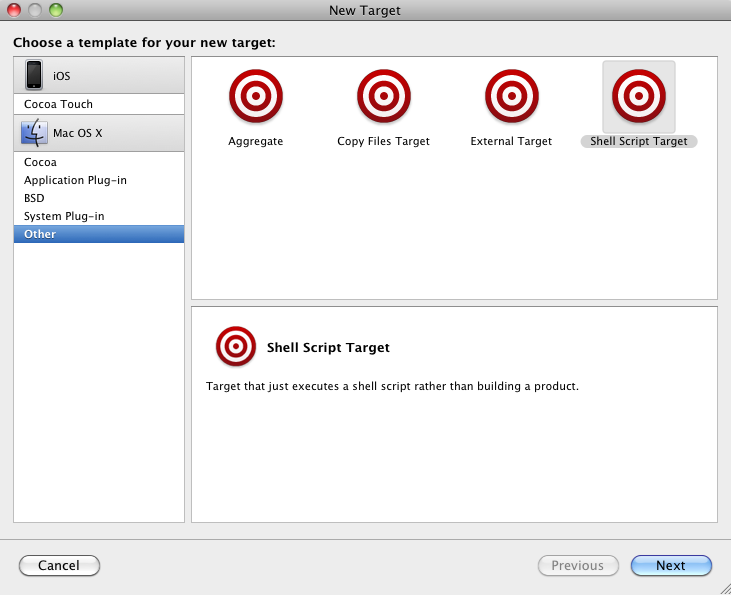
Xcode Aggregate Targets
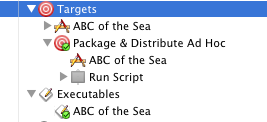
Example Shell Script Target
You now have a new target in Groups & Files. If you expand it you will see it has a single build step named “Run Script“.
You should right-click on this, select Get Info and you will then be presented with a dialog box with a basic “Script” text entry field.
What I use here looks like this:
|
1 2 |
${HOME}/bin/ipa-packager || exit 1 exit 0 |
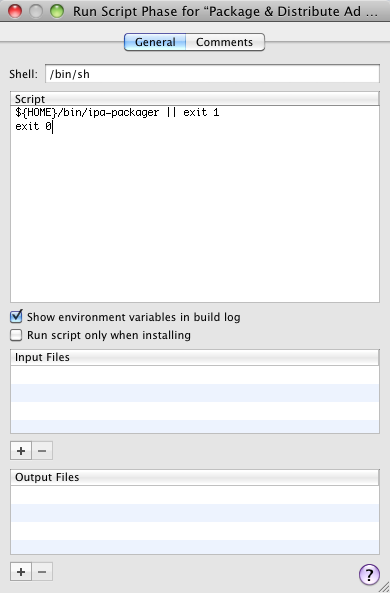
Shell Script Configuration
Quite simply, ipa-packager is a shell script based on the one in a previous blog post that does the packaging for me. If it returns an error code, so do we – this is the signal to Xcode to stop the build process. All the other options to the Run Script dialog we leave at defaults.
Lastly, we need to make this new target depend on the target of our app. The easiest mechanism to do this is to simply drag-and-drop the app target, under Groups & Files, into the new target. Job done.
Packaging revisited
So, what next? If we try to build the project above it will complain because ipa-packager doesn’t exist. I reworked the script from my previous blog post to work either directly from the command line or using the environment variables that Xcode passes to scripts. The revised version appears below and is attached at the bottom, for download.
I also improved a number of items, particularly dependency checking so it does not re-do work that is unnecessary. Another area I paid attention to is being able to provide some of the settings in either the Xcode project or target build configuration – any user-defined values are also provided in the environment of the script. This is just as well since, because the script is called from its own target, the environment variable identifying the current target is that of the script, not our iOS app! Consequently, I have to provide at least one setting in the project: ADHOC_TARGET_NAME which I set to the name of the app.
One more major improvement is the provision of a local “configuration” file that allows a user of this script to set their own defaults without having to tweak the script itself. An example is given below. I will at some point add a command line tweak to allow for an arbitrary file to be used for this configuration.
Shell script: ipa-packager»
Configuration file: ~/.adhoc-distribution.conf»
Naturally you will wish to alter the publishing URL to one that works for you or, as described in the next section, you can do this in the project configuration inside Xcode.
The observant reader will have noticed references to an ADHOC_TEMPLATE_HTML value. This is not yet used but it will allow a project to provide its own HTML template for the generated index.html file, the same way it does now for the README.txt file.
Configuring from Xcode
So, we have our Xcode target and we have the script that does the magic of packaging and distributing an Ad Hoc build. There’s one component left – the values that we need to pass from Xcode to ipa-packager. There’s more than one place you can do this (project or target level), and you can apply it to just Ad Hoc builds or to all – even though it won’t distribute code for non Ad Hoc builds, you may wish to archive development and release builds all the same. You should decide what functionality you want and where to keep the values. The suggested approach is to keep values unique to a target within that targets configuration and is what I shall demonstrate here.
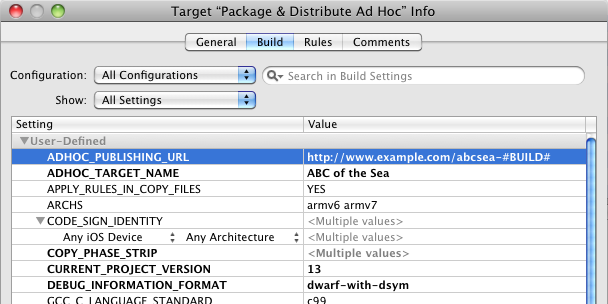
Xcode Target Build Configuration
We need the Target Info page open for the aggregate “Run Shell Script” target we added earlier (right-click, control-click or double-click on the target under Groups & Files) and select the Build tab. The item “Configuration:” is where you will decide whether to apply the values to one specific configuration (such as Ad Hoc) or to all of them. Then quit simply use the cog-menu at bottom-left to Add User-Defined Setting. There is only value you must specify as barest minimum: ADHOC_TARGET_NAME which needs to refer to the name of the target in the project that contains your app. This should also be the same as the application name – that is, the name of the .app package.
You can also specify any of the values used by ipa-packager though note that the results may be undefined if you try to redefine a value provided by Xcode itself. Where I use a common URL scheme for all my projects, others may wish to specify a unique URL for each project and you can do that here by adding a value for ADHOC_PUBLISHING_URL to their project. See the script for the full list of values it will look for.
Replaceable values
Some of the environment variables that ipa-packager uses have a notion of replaceable values. These are components of a string that are replaced with values that are determined at runtime. The idea is to enable these variables to provide a template for the final value. For example, the default for ADHOC_PUBLISHING_URL is http://localhost/iosbeta/#SHORTBUNDLEID#-#BUILD#. Note: You keep using 'localhost'. Why?» #SHORTBUNDLEID# is replaced with “abcsea” (the last component of org.flirble.abcsea) and #BUILD# is replaced by the current build number which is discovered by reading the key CFBundleVersion from the targets Info.plist file.
Not all variables are checked for replaceable values since it is not a trivial process in a shell script. You can check in the script to see which ones are by looking at the contents of variable replacement_options. At the time of writing, this contained:
|
1 2 3 |
replacement_options="ADHOC_PUBLISHING_URL ADHOC_DELIVERY_NAME \ ADHOC_TEMPLATE_HTML ADHOC_PUBLISHING_DIRECTORY \ ADHOC_PUBLISHING_COMMAND" |
The replaceable values are:
#PROJECT# |
Project name (spaces removed) |
#APP# or #TARGET# |
The app/target name (spaces removed) |
#CONFIG# |
The build configuration name (Release, Ad Hoc) |
#VERSION# |
The version number (from CFBundleShortVersionString) |
#BUILD# |
The build number (from CFBundleVersion) |
#BUNDLEID# |
The bundle ID |
#SHORTBUNDLEID# |
The last component of the bundle ID |
#PLATFORM# |
The targetted platform, iphoneos or iphonesimulator |
These values can appear anywhere within variables that are inspected, and any number of times.
The result
A picture says it all…
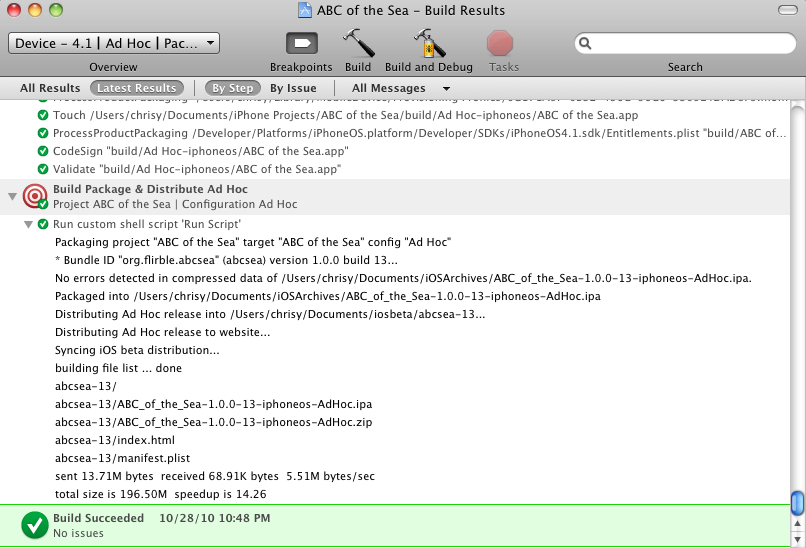
Xcode Build Results with ipa-packager
Attachments
Note that some files may be downloaded with a .txt file extension to overcome WordPress security checks. Just rename the file if necessary once downloaded.
ADHOC_CONFIG_ADHOC which you are free to change.Powered by Hackadelic Sliding Notes 1.6.5|
1 2 3 4 5 6 7 8 9 10 11 12 13 14 15 16 17 18 19 20 21 22 23 24 25 26 27 28 29 30 31 32 33 34 35 36 37 38 39 40 41 42 43 44 45 46 47 48 49 50 51 52 53 54 55 56 57 58 59 60 61 62 63 64 65 66 67 68 69 70 71 72 73 74 75 76 77 78 79 80 81 82 83 84 85 86 87 88 89 90 91 92 93 94 95 96 97 98 99 100 101 102 103 104 105 106 107 108 109 110 111 112 113 114 115 116 117 118 119 120 121 122 123 124 125 126 127 128 129 130 131 132 133 134 135 136 137 138 139 140 141 142 143 144 145 146 147 148 149 150 151 152 153 154 155 156 157 158 159 160 161 162 163 164 165 166 167 168 169 170 171 172 173 174 175 176 177 178 179 180 181 182 183 184 185 186 187 188 189 190 191 192 193 194 195 196 197 198 199 200 201 202 203 204 205 206 207 208 209 210 211 212 213 214 215 216 217 218 219 220 221 222 223 224 225 226 227 228 229 230 231 232 233 234 235 236 237 238 239 240 241 242 243 244 245 246 247 248 249 250 251 252 253 254 255 256 257 258 259 260 261 262 263 264 265 266 267 268 269 270 271 272 273 274 275 276 277 278 279 280 281 282 283 284 285 286 287 288 289 290 291 292 293 294 295 296 297 298 299 300 301 302 303 304 305 306 307 308 309 310 311 312 313 314 315 316 317 318 319 320 321 322 323 324 325 326 327 328 329 330 331 332 333 334 335 336 337 338 339 340 341 342 343 344 345 346 347 348 349 350 351 352 353 354 355 356 357 358 359 360 361 362 363 364 365 366 367 368 369 370 371 372 373 374 375 376 377 378 379 380 381 382 383 384 385 386 387 388 389 390 391 392 393 394 395 396 397 398 399 400 401 402 403 404 405 406 407 408 409 410 411 412 413 414 415 416 417 418 419 420 421 422 423 424 |
#!/bin/sh # Build an IPA package from an Ad Hoc build and then # package it for Ad Hoc distribution. # This version is designed for use as a Shell Script Target # called directly by Xcode. # (c) 2010 Chris Luke. Copying is fine, but please attribute to me! # Useful environment variables Xcode provides: # BUILD_DIR # CONFIGURATION # CONFIGURATION_BUILD_DIR # CONFIGURATION_TEMP_DIR # EFFECTIVE_PLATFORM_NAME # ACTION (build|clean) # CURRENT_PROJECT_VERSION # PROJECT_DIR # PROJECT_NAME # PROJECT_TEMP_DIR # TARGET_TEMP_DIR # User settings we can place in the target settings: # ADHOC_PUBLISHING_URL with replaceables # ADHOC_TARGET_NAME the target we want to copy from # ADHOC_BUNDLE_SOURCE the build dir of the app we want to copy for # distribution- built from TARGET_NAME if not set # ADHOC_TEMPLATE_HTML template for index.html # ADHOC_TEMPLATE_README templatye for readme file # ADHOC_DELIVERY_NAME name of .zip/.ipa with replaceables # ADHOC_DELIVERY_DIRECTORY directory to deliver a .zip archive of app to # ie, releases, archived copies # ADHOC_DELIVER_DSYM If set and not 0 or no then we also copy the .dSYM # ADHOC_PUBLISHING_DIRECTORY directory to deliver the pkg to with replaceables # ADHOC_PUBLISHING_COMMAND command to execute to push materials out with # ADHOC_CONFIG_ADHOC the label used for ad hoc builds # ADHOC_CONFIG_RELEASE the label used for release builds # ADHOC_AUTHOR # Configuration can go into ~/.adhoc-distribution.conf . Defaults have the # form DEFAULT_<VARIABLE_NAME> and are used only if the variable is not set. # If you name a variable directly in the config, it overwrites any existing # value. # Replaceable values, where supported: # #PROJECT# Project name (spaces removed) # #APP# #TARGET# The app/target name (spaces removed) # #CONFIG# The build configuration name (Release, Ad Hoc) # #VERSION# The version number (from CFBundleShortVersionString) # #BUILD# The build number (from CFBundleVersion) # #BUNDLEID# The bundle ID # #SHORTBUNDLEID# The last component of the bundle ID # #PLATFORM# The targetted platform, iphoneos or iphonesimulator # pfx="Ad-Hoc IPA Packager:" err="$pfx" config_file="$HOME/.adhoc-distribution.conf" # Some generic defaults. These can be overridden in a local config file DEFAULT_BASEDIR= DEFAULT_ADHOC_PUBLISHING_URL="http://localhost/iosbeta/#SHORTBUNDLEID#-#BUILD#" DEFAULT_ADHOC_PUBLISHING_DIRECTORY="$HOME/Documents/iosbeta/#SHORTBUNDLEID#-#BUILD#" DEFAULT_ADHOC_PUBLISHING_COMMAND=$HOME/bin/sync-iosbeta DEFAULT_ADHOC_DELIVERY_NAME="#APP#-#VERSION#-#BUILD#-#CONFIG#.ipa" DEFAULT_ADHOC_DELIVERY_DIRECTORY="$HOME/Documents/iOSArchives" DEFAULT_ADHOC_DELIVER_DSYM=yes DEFAULT_ADHOC_CONFIG_ADHOC="Ad Hoc" DEFAULT_ADHOC_CONFIG_RELEASE="Release" DEFAULT_ADHOC_AUTHOR=$(id -P | cut -d: -f8) DEFAULT_verbose=0 DEFAULT_FORCEPKG=0 default_options="BASEDIR \ ADHOC_PUBLISHING_URL ADHOC_TARGET_NAME ADHOC_BUNDLE_SOURCE \ ADHOC_TEMPLATE_HTML ADHOC_TEMPLATE_README ADHOC_DELIVERY_NAME \ ADHOC_DELIVERY_DIRECTORY ADHOC_PUBLISHING_DIRECTORY \ ADHOC_PUBLISHING_COMMAND ADHOC_CONFIG_ADHOC ADHOC_CONFIG_RELEASE \ ADHOC_DELIVER_DSYM ADHOC_AUTHOR verbose FORCEPKG" mandatory_options="ADHOC_TARGET_NAME ADHOC_DELIVERY_NAME \ ADHOC_DELIVERY_DIRECTORY ADHOC_CONFIG_ADHOC ADHOC_CONFIG_RELEASE \ BUILD_DIR CONFIGURATION CONFIGURATION_BUILD_DIR \ CONFIGURATION_TEMP_DIR ACTION PROJECT_DIR PROJECT_NAME \ TARGET_TEMP_DIR" mandatory_directories="PROJECT_DIR CONFIGURATION_BUILD_DIR \ CONFIGURATION_TEMP_DIR TARGET_TEMP_DIR ADHOC_DELIVERY_DIRECTORY" replacement_options="ADHOC_PUBLISHING_URL ADHOC_DELIVERY_NAME \ ADHOC_TEMPLATE_HTML ADHOC_PUBLISHING_DIRECTORY \ ADHOC_PUBLISHING_COMMAND" # Load any local configuration [ -f "${config_file}" ] && . "${config_file}" # See if any defaults need to be loaded for opt in ${default_options}; do val= eval "val=\"\$$opt\"" if [ -z "$val" ]; then val= eval "val=\"\$DEFAULT_$opt\"" [ ! -z "$val" ] && eval "$opt=\"$val\"" fi done docmd=0 dohelp=0 [ -t 0 -a -z "${ACTION}" ] && dohelp=1 while [ "$1" ]; do opt=$1 dohelp=0 case "$opt" in --project|-p) PROJECT_NAME="$2"; shift docmd=1 shift;; --target|--app|-t|-a) ADHOC_TARGET_NAME="$2"; shift docmd=1 shift;; --config*|-c) CONFIGURATION="$2"; shift shift;; --basedir|-b) if [ -z "${PROJECT_NAME}" ]; then echo "$err Specify project name before base directory." exit 1 fi if [ -z "${ADHOC_TARGET_NAME}" ]; then echo "$err Specify target name before base directory." exit 1 fi BASEDIR="$2"; shift shift;; --force*|-f) FORCEPKG=1 shift;; --verbose|-v) verbose=1 shift;; --help|-h) dohelp=1 shift;; *) dohelp=1 echo "Unknown option \"$opt\"." shift;; esac [ "${dohelp}" = 1 ] && break done if [ "${dohelp}" = 1 ]; then cat << EOT $pfx Usage: $(basename $0) [options] --project|-p <name> Project name --target|--app|-t|-a <name> Target name --config|-c <name> Project configuration name (Debug, Release, Ad Hoc) --basedir|-b <dir> Parent directory of projects --force|-f Force packaging, even if up-to-date --help|-h This message --verbose|-v Verbose mode Configuration can also be loaded from "${config_file}" EOT exit 1 fi if [ ! -z "${BASEDIR}" -a "${docmd}" = 1 -a ! -z "${PROJECT_NAME}" -a \ ! -z "${ADHOC_TARGET_NAME}" ]; then if [ ! -d "${BASEDIR}" ]; then echo "$err Basedir \"${BASEDIR}\" is not readable." exit 1 fi [ -z "${CONFIGURATION}" ] && CONFIGURATION="${DEFAULT_ADHOC_CONFIG_ADHOC}" ACTION=build EFFECTIVE_PLATFORM_NAME=-iphoneos PROJECT_DIR="${BASEDIR}/${PROJECT_NAME}" BUILD_DIR="${PROJECT_DIR}/build" PROJECT_TEMP_DIR="${BUILD_DIR}/${PROJECT_NAME}.build" CONFIGURATION_BUILD_DIR="${BUILD_DIR}/${CONFIGURATION}${EFFECTIVE_PLATFORM_NAME}" CONFIGURATION_TEMP_DIR="${BUILD_DIR}/${PROJECT_NAME}.build/${CONFIGURATION}${EFFECTIVE_PLATFORM_NAME}/${PROJECT_NAME}.build" TARGET_BUILD_DIR="${CONFIGURATION_BUILD_DIR}" TARGET_TEMP_DIR="${BUILD_DIR}/${PROJECT_NAME}.build/${CONFIGURATION}${EFFECTIVE_PLATFORM_NAME}/${ADHOC_TARGET_NAME}.build" fi if [ "${ACTION}" != build ]; then if [ "${docmd}" = 1 ]; then echo "$err Incomplete parameters." echo "Need basedir, project name and target name, at minimum." exit 1 fi [ "${verbose}" = 1 ] && echo "$pfx No packaging for action \"${ACTION}\"." exit 0 # we only work when building, not cleaning fi if [ -z "${BUILD_DIR}" -o ! -d "${BUILD_DIR}" ]; then echo "$err No valid BUILD_DIR!" exit 1 fi # Check for mandatory values for opt in ${mandatory_options}; do val= eval "val=\"\$$opt\"" if [ -z "$val" ]; then echo "$err Variable $opt is mandatory, yet empty." exit 1 fi done # Check for mandatory directories for opt in ${mandatory_directories}; do val= eval "val=\"\$$opt\"" if [ ! -d "$val" ]; then echo "$err $opt is a missing mandatory directory \"$val\"." exit 1 fi done if [ -z "${ADHOC_BUNDLE_SOURCE}" ]; then ADHOC_BUNDLE_SOURCE="${CONFIGURATION_BUILD_DIR}/${ADHOC_TARGET_NAME}.app" fi if [ ! -d "${ADHOC_BUNDLE_SOURCE}" ]; then echo "$err Can't find App \"${ADHOC_TARGET_NAME}\" at \"${ADHOC_BUNDLE_SOURCE}\"" exit 1 fi plist="${ADHOC_BUNDLE_SOURCE}/Info.plist" if [ ! -f "${plist}" ]; then echo "$err Can't find \"Info.plist\" at \"${plist}\"" pwd exit 1 fi # Get build and release versions bundle_id=$(plutil -convert xml1 -o - - < "${plist}" | \ grep -A 1 CFBundleIdentifier | \ sed -e 's/<[^>]*>//g' -e 's/[ ]//g'| tail -1) bundle_short=$(echo "${bundle_id}" | sed -Ee 's/^.*\.(.*)$/\1/') release_ver=$(plutil -convert xml1 -o - - < "${plist}" | \ grep -A 1 CFBundleShortVersionString | \ sed -e 's/<[^>]*>//g' -e 's/[ ]//g'| tail -1) build_ver=$(plutil -convert xml1 -o - - < "${plist}" | \ grep -A 1 CFBundleVersion | \ sed -e 's/<[^>]*>//g' -e 's/[ ]//g'| tail -1) config=$(echo "${CONFIGURATION}" | sed -e 's/ *//g') ws_project_name=$(echo "${PROJECT_NAME}" | sed -e 's/ */_/g') ws_app_name=$(echo "${ADHOC_TARGET_NAME}" | sed -e 's/ */_/g') ws_platform=$(echo "${EFFECTIVE_PLATFORM_NAME}" | sed -e 's/^-//') echo "Packaging project \"${PROJECT_NAME}\" target \"${ADHOC_TARGET_NAME}\" config \"${CONFIGURATION}\"" echo "* Bundle ID \"${bundle_id}\" (${bundle_short}) version ${release_ver} build ${build_ver}..." # Do parameter replacement for opt in ${replacement_options}; do val= eval "val=\"\$$opt\"" val=$(echo "$val" | sed -e "s/#PROJECT#/${ws_project_name}/g" \ -e "s/#APP#/${ws_app_name}/g" \ -e "s/#TARGET#/${ws_app_name}/g" \ -e "s/#CONFIG#/${config}/g" \ -e "s/#BUILD#/${build_ver}/g" \ -e "s/#VERSION#/${release_ver}/g" \ -e "s/#BUNDLEID#/${bundle_id}/g" \ -e "s/#SHORTBUNDLEID#/${bundle_short}/g" \ -e "s/#PLATFORM#/${ws_platform}/g" ) eval "$opt=\"$val\"" done mkdir -p "${ADHOC_DELIVERY_DIRECTORY}" || exit 1 [ -z "${ADHOC_DELIVERY_NAME}" ] && \ ADHOC_DELIVERY_NAME="${ADHOC_TARGET_NAME}-${release_ver}-${build_ver}-${config}.zip" zip="${ADHOC_DELIVERY_DIRECTORY}/${ADHOC_DELIVERY_NAME}" zip=$(echo "${zip}" | sed -e 's/ */_/g') if [ "$(echo "${zip}" | grep -Ec '\.(zip|ipa)$')" = 0 ]; then echo "$err ADHOC_DELIVERY_NAME needs to end with .ipa or .zip" echo "The expanded name was: \"$zip\"." exit 1 fi [ "$verbose" = 1 ] && echo "+ zip=$zip" dsymin="${ADHOC_BUNDLE_SOURCE}.dSYM" dsymout=$(echo "${zip}" | sed -Ee 's/\.(zip|ipa)$/.dSYM.zip/') [ "$verbose" = 1 ] && echo "+ dsymin=$dsymin" [ "$verbose" = 1 ] && echo "+ dsym=$dsymout" dozip=yes if [ -f "${zip}" ]; then # See if zip is older than the code signature or binary tf="${ADHOC_BUNDLE_SOURCE}/_CodeSignature/CodeResources" [ -f "${tf}" ] || tf="${ADHOC_BUNDLE_SOURCE}/${ADHOC_TARGET_NAME}" if [ -f "${tf}" -a "${zip}" -nt "${tf}" ]; then dozip=no [ "${verbose}" = 1 ] && echo "$pfx Existing archive is still current, no need to build." fi fi dodsym=no if [ ! -z "${ADHOC_DELIVER_DSYM}" -a -d "${dsymin}" ]; then case "${ADHOC_DELIVER_DSYM}" in [Nn][Oo]|0) dodsym=no;; *) dodsym=yes;; esac if [ "${dsymin}" -ot "${dsymout}" ]; then [ "${verbose}" = 1 ] && echo "$pfx Existing dSYM is still current, no need to copy." dodsym=no fi fi if [ "${dozip}" = yes -o "${FORCEPKG}" = 1 ]; then # Make a copy of the build into the Payload directory tmpdir="${TARGET_TEMP_DIR}/adhoc-pkg" payloaddir="${tmpdir}/Payload/${ADHOC_TARGET_NAME}.app" payload="Payload" rm -rf "${tmpdir}" mkdir -p "${payloaddir}" || exit 1 cp -rp "${ADHOC_BUNDLE_SOURCE}/" "${payloaddir}/" || exit 1 oldpwd=$(pwd) cd "${payloaddir}/../../" || exit 1 bindir="${payload}/${ADHOC_TARGET_NAME}.app" # Now zip it up year=$(date +%Y) rm -f "${zip}" opt_zip= [ "${verbose}" = 0 ] && opt_zip="-q" zip -Xyrz ${opt_zip} "${zip}" "${bindir}" << EOT | grep -v 'enter new zip file comment' Project: ${PROJECT_NAME} App: ${ADHOC_TARGET_NAME} Build configuration: ${CONFIGURATION} Release: ${release_ver} Build: ${build_ver} (c) ${year} ${ADHOC_AUTHOR} . EOT #zip -T "${zip}" || exit 1 unzip -tq "${zip}" || exit 1 echo "Packaged into ${zip}" cd "${oldpwd}" rm -rf "${tmpdir}" fi if [ "${dodsym}" = yes ]; then [ "${verbose}" = 1 ] && echo "$pfx Archiving dSYM..." oldpwd=$(pwd) cd "${dsymin}/../" year=$(date +%Y) rm -f "${dsymout}" opt_zip= [ "${verbose}" = 0 ] && opt_zip="-q" dsymname=$(basename "${dsymin}") zip -Xyrz ${opt_zip} "${dsymout}" "${dsymname}" << EOT | grep -v 'enter new zip file comment' Project: ${PROJECT_NAME} App: ${ADHOC_TARGET_NAME} Build configuration: ${CONFIGURATION} Release: ${release_ver} Build: ${build_ver} (c) ${year} ${ADHOC_AUTHOR} . EOT cd "${oldpwd}" fi # If it's Ad Hoc, the right options are set, it's iphoneos and it has been codesigned, we can publish it. if [ "${CONFIGURATION}" = "${ADHOC_CONFIG_ADHOC}" -a \ "${ADHOC_PUBLISHING_DIRECTORY}" -a "${ADHOC_PUBLISHING_URL}" \ -a "${EFFECTIVE_PLATFORM_NAME}" = "-iphoneos" -a \ -f "${ADHOC_BUNDLE_SOURCE}/_CodeSignature/CodeResources" ]; then # If it exists already, see if it is fresh. dopkg=yes pkg="${ADHOC_PUBLISHING_DIRECTORY}/"$(echo "${ADHOC_DELIVERY_NAME}" | \ sed -e 's/\.ipa$/.zip/') if [ -f "${pkg}" ]; then if [ "${pkg}" -nt "${zip}" ]; then dopkg=no [ "${verbose}" = 1 ] && echo "$pfx Existing package is still current, no need to package and distribute." fi fi if [ "${dopkg}" = yes -o "${FORCEPKG}" = 1 ]; then # One more step - package it up for iosbeta distribution! echo "Distributing Ad Hoc release into ${ADHOC_PUBLISHING_DIRECTORY}..." mkdir -p "${ADHOC_PUBLISHING_DIRECTORY}" || exit 1 opt_readme= [ ! -z "${ADHOC_TEMPLATE_README}" -a \ -f "${ADHOC_TEMPLATE_README}" ] && \ opt_readme="-r \"${ADHOC_TEMPLATE_README}\"" opt_html= [ ! -z "${ADHOC_TEMPLATE_HTML}" -a \ -f "${ADHOC_TEMPLATE_HTML}" ] && \ opt_html="-r \"${ADHOC_TEMPLATE_HTML}\"" cmd="open -n \"$HOME/Documents/MacOSX Projects/BetaBuilder TFO/build/Debug/BetaBuilder.app\" --args \ -i \"${zip}\" \ -o \"${ADHOC_PUBLISHING_DIRECTORY}\" \ -u \"${ADHOC_PUBLISHING_URL}\" \ ${opt_readme} ${opt_html}" if eval "${cmd}"; then if [ ! -z "${ADHOC_PUBLISHING_COMMAND}" -a \ -x "${ADHOC_PUBLISHING_COMMAND}" ]; then echo "Distributing Ad Hoc release to website..." "${ADHOC_PUBLISHING_COMMAND}" fi else echo "BetaBuilder encountered an error. Check system logs." exit 1 fi fi fi exit 0 |
|
1 2 3 4 5 6 7 8 9 10 11 12 13 14 15 16 17 18 |
# ~/.adhoc-distribution.conf # Default values for our IPA packager and Ad Hoc distribution script # DEFAULT_BASEDIR="$HOME/Documents/iPhone Projects" DEFAULT_ADHOC_PUBLISHING_URL="http://localhost/iosbeta/#SHORTBUNDLEID#-#BUILD#" DEFAULT_ADHOC_PUBLISHING_DIRECTORY="$HOME/Documents/iosbeta/#SHORTBUNDLEID#-#BUILD#" DEFAULT_ADHOC_PUBLISHING_COMMAND=$HOME/bin/sync-iosbeta DEFAULT_ADHOC_DELIVERY_NAME="#APP#-#VERSION#-#BUILD#-#PLATFORM#-#CONFIG#.ipa" DEFAULT_ADHOC_DELIVERY_DIRECTORY="$HOME/Documents/iOSArchives" DEFAULT_ADHOC_CONFIG_ADHOC="Ad Hoc" DEFAULT_ADHOC_CONFIG_RELEASE="Release" DEFAULT_ADHOC_AUTHOR=$(id -P | cut -d: -f8) DEFAULT_ADHOC_TEMPLATE_README=README.txt DEFAULT_ADHOC_TEMPLATE_HTML= |
localhost just as an example, and to avoid making the URL of my real beta site too public. You should set ADHOC_PUBLISHING_URL to use the hostname of your own website.Powered by Hackadelic Sliding Notes 1.6.5
Pingback: Tweets that mention Chris Luke » Blog Archive » iOS Ad-Hoc Beta publishing directly from Xcode -- Topsy.com